Scrape Amazon.
Sync to WooCommerce. Done.

Import Amazon product variants — titles, ASINs, prices, bullet points and high-resolution images — straight into your WooCommerce store with a single click. Or export everything to a CSV / Excel spreadsheet.
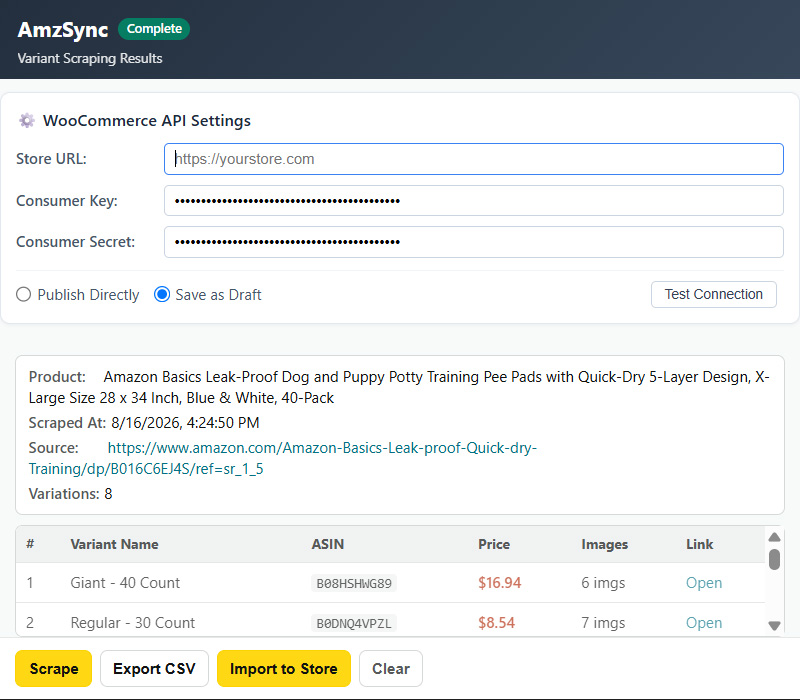
AmzSync extension scraping an Amazon product page and importing variants into WooCommerce

AmzSync scrapes every variant of an Amazon product and imports them into your store in one click.

Everything you need to list Amazon products

Built for WooCommerce store owners who source products from Amazon.

All variants, one click

Batch-scrape every Color × Size combination of a product — dozens of variants in seconds, not minutes.

Full product data

Titles, ASINs, prices, bullet-point descriptions and high-resolution images captured for every variant.

Direct WooCommerce import

Connects to your store via the official REST API. Variant structure is preserved, publish or save as draft.

📊

CSV / Excel export

Prefer spreadsheets? Export every variant as a clean, structured CSV ready for Excel or Google Sheets.

Background import

Imports keep running even if you close the popup or switch tabs. Come back when it's done.

🌐

8 Amazon marketplaces

Works on amazon.com, .co.uk, .de, .fr, .co.jp, .ca, .com.au and .cn.

From Amazon listing to your store in 3 steps

No copy-pasting, no spreadsheet juggling.

1

Open an Amazon product page

Navigate to any product with variants on a supported Amazon site.

2

Click "Scrape"

AmzSync fetches every variant with its full data and shows a review table.

3

Import to Store

One click sends the whole product — with all variants — into your WooCommerce store.

Simple pricing

Start free. Upgrade when your store grows.

Free

$0 / month
  • 15 products per month
  • All scraping features included
  • WooCommerce import & CSV export
  • All 8 Amazon marketplaces
Install for free

Payments are processed securely by Creem, our Merchant of Record. VAT / sales tax handled at checkout.

Frequently asked questions

Does it work with my WooCommerce store?

Yes — as long as your store has the REST API enabled and you can create API keys (Consumer Key / Consumer Secret). That's a standard WooCommerce feature found in Settings → Advanced → REST API.

Where are my store credentials stored?

Entirely in your browser's local storage. Your WooCommerce API keys never leave your device and are never uploaded to any server.

Which Amazon sites are supported?

amazon.com, amazon.co.uk, amazon.de, amazon.fr, amazon.co.jp, amazon.ca, amazon.com.au and amazon.cn.

What's the difference between Free and Pro?

Only the monthly volume: Free lets you import 15 products per month, Pro is unlimited. Every feature is available in both plans.

How do I upgrade to Pro?

Click "Upgrade to Pro", complete the payment, and paste the license key you receive into the extension. Activation is instant and you can move your license between devices.